SAP Modernisation
S/4HANA Data Migration: What the Migration Cockpit Does and Where It Runs Out
What the SAP S/4HANA Migration Cockpit handles, the five gaps it leaves to your programme, and when a migration factory or extra tooling is needed.
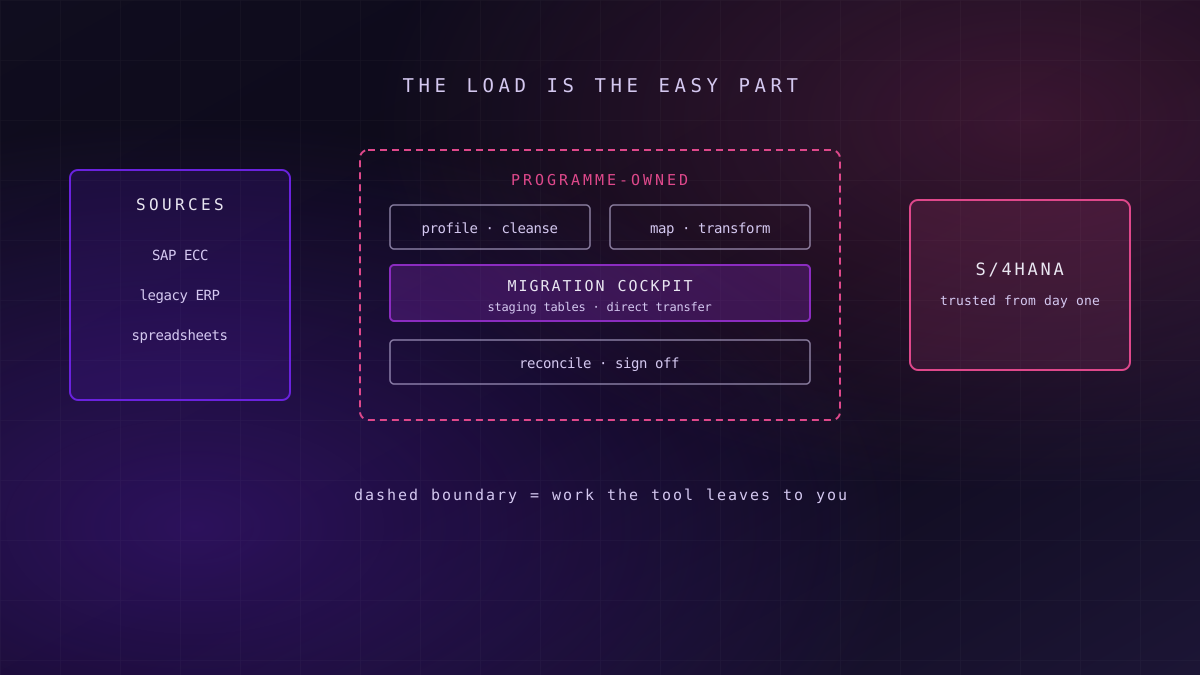
The SAP S/4HANA Migration Cockpit reliably loads master data, open items and balances into S/4HANA through predefined migration objects, using staging tables or direct transfer. It does not decide which data deserves to move, fix poor-quality records, handle complex transformation logic or prove the result reconciles. Those gaps decide whether a migration lands on time.
Every S/4HANA programme that is not a pure technical conversion has to load business data into a new system, and SAP ships a capable tool for it. The trouble starts when teams treat the tool as the plan. This guide sets out what the cockpit does well, where it stops, and how to tell when you need more than it offers.
Why the Data Load Decides the Go-Live Date
What this means for you: the cutover weekend is where a migration succeeds or fails, and the data load is the part of cutover with the least slack.
SAP has committed to mainstream maintenance for SAP ECC 6.0 until 31 December 2027, with optional extended maintenance available to 31 December 2030 at additional cost. That fixes the window for most programmes, and it means data migration work is being compressed into the same few years across the market, competing for the same scarce specialists.
Data migration sits on the critical path in a way few other workstreams do. Configuration can be finished early and tested at leisure. Data has to be extracted from a live system, transformed, loaded, validated and signed off inside a cutover window measured in hours or days. Every defect found during a mock load moves the date; every defect missed surfaces after go-live, in front of finance and operations.
Tooling decides how quickly data moves; the programme decides whether the data deserved to move at all.
The wider decisions about which entities and processes belong in the target landscape are covered in our view of why S/4HANA is a data architecture decision. This article assumes those choices are made and focuses on getting the data in, correctly.
What the SAP S/4HANA Migration Cockpit Actually Is
What this means for you: knowing exactly what the cockpit is scoped to do stops a programme from budgeting for capabilities it does not have.
The SAP S/4HANA Migration Cockpit is SAP's built-in tool for loading business data into SAP S/4HANA. It is delivered as part of S/4HANA, used through the Fiori app "Migrate Your Data", and works through predefined migration objects: packaged definitions for business entities such as customers, suppliers, materials, open receivables and payables, general ledger balances and fixed assets.
Each migration object carries its own target structure, field mapping and validation, and calls standard SAP interfaces to post the data, so loaded records pass the same checks as records entered by hand. Where a standard object does not fit, the Migration Object Modeler lets teams extend or create objects.
Since the S/4HANA 2020 release the cockpit offers two approaches. The older transaction LTMC, used in earlier releases, has been retired in favour of the Fiori app.
| Approach | How data gets in | Best suited to | What it costs you |
|---|---|---|---|
| Staging tables | Data is written to database staging tables, from templates or by an ETL tool, then loaded by migration object | Non-SAP sources, data that needs transformation before load, multiple legacy systems | You own extraction and transformation into the staging format |
| Direct transfer | The cockpit reads directly from an SAP source system over a remote connection | SAP ERP sources moving to S/4HANA with limited restructuring | Less control over cleansing and transformation in flight |
| Migration Object Modeler | Extends or creates migration objects | Custom fields and entities the standard objects miss | Custom objects need their own testing and maintenance |
The cockpit is a load mechanism with good validation. It is not a data quality platform, a transformation engine or a reconciliation tool, and SAP does not position it as one.
What the Cockpit Does Well
What this means for you: for standard entities with clean source data, the cockpit is the shortest route to a correct load, and building around it is a mistake.
Standard objects with built-in validation
Predefined migration objects remove a large amount of design work. Field structures, dependencies between objects, and the sequence in which they must load are already known. Because data is posted through standard interfaces, a supplier with an invalid tax code or a material assigned to a non-existent plant is rejected at load time rather than discovered later.
Simulation before commitment
The cockpit can simulate a load before posting it, surfacing errors without creating records. That turns mock loads into a tight feedback loop: load, read the error log, fix the source or the mapping, and load again. Teams that run several full mock loads find most structural defects well before cutover.
Key idea
Use the standard objects wherever they fit
Every custom object or bespoke load program is code you must test, document and maintain through every mock load. Start from the cockpit's predefined objects and justify each departure from them, not the other way round.
Repeatability across mock loads
Projects, mappings and value conversions persist between runs, so each mock load starts from the last one's learning. For a programme running three or four rehearsals before go-live, that repeatability matters more than raw speed.
Where the Migration Cockpit Runs Out
What this means for you: each gap below is real work that has to be planned, staffed and budgeted outside the cockpit, usually by the same people already running the load.
The gaps are not flaws in the tool. They are tasks outside its scope, and programmes get into trouble when nobody owns them.
Data quality and cleansing
The cockpit rejects records that fail validation; it does not find duplicates, fix addresses or decide which of three customer records is the real one.
Complex transformation
Restructured organisational units, merged company codes and new account structures need mapping logic beyond simple value conversion.
Reconciliation and sign-off
Proving that balances, counts and key totals match between source and target is the programme's job, and auditors will ask for the evidence.
Non-SAP sources and volume
Several legacy systems, large transactional volumes and tight cutover windows push beyond templates and need engineered extraction and staging.
Data quality is upstream of the load
A migration exposes years of accumulated duplicates, incomplete records and inconsistent coding. The cockpit will reject what fails validation, but it cannot tell you that two suppliers are the same company or that half your materials have not moved in five years. That assessment needs profiling against defined rules and owners who can decide what to fix, merge or leave behind. The discipline is the same one behind data observability and quality management for any platform.
Failure mode
Failure mode: cleansing during the mock loads
When data quality is left to the load cycle, each mock load becomes a cleansing exercise, error logs run to thousands of lines and the date slips. Cleansing belongs in its own workstream that starts months before the first rehearsal.
Transformation logic beyond value mapping
The cockpit handles value conversion well: old plant codes to new, old payment terms to new. It handles structural change less well. Merging company codes, redesigning the chart of accounts, splitting a customer into business partner roles or rebuilding material classifications needs transformation logic that is easier to build, test and version in a proper data engineering layer before data reaches the staging tables.
Reconciliation is a deliverable, not a check
Finance will not sign off a go-live on the basis that the load reported no errors. They need evidence that open items, balances and record counts agree between source and target, broken down in ways they recognise. That evidence has to be designed: which totals, at what level, compared how, and signed off by whom. Without a defined data lineage from source record to target record, every discrepancy becomes a manual investigation.
Several sources, large volumes, short windows
When data comes from several legacy systems, some of them not SAP, the staging approach puts the burden of extraction and harmonisation on the programme. When transactional volumes are large and the cutover window is short, load performance and sequencing become engineering problems in their own right.
When You Need a Migration Factory or Additional Tooling
What this means for you: the cockpit plus spreadsheets is enough for a small, clean, single-source migration; anything larger needs an engineered layer around it.
A migration factory treats data migration as a repeatable production line rather than a one-off project. Data is profiled and cleansed against rules, transformed in a versioned and testable layer, written to the cockpit's staging tables, loaded, and reconciled automatically after every run. The cockpit stays at the centre; the factory supplies everything around it.
| Signal in your programme | Cockpit and templates suffice when | Add an engineered layer when |
|---|---|---|
| Number of source systems | One SAP ERP system | Several systems, including non-SAP |
| Data quality | Profiled, owned and broadly clean | Duplicates and gaps nobody has measured |
| Structural change | Like-for-like organisational structure | Merged company codes or redesigned finance structures |
| Volume and window | Moderate volumes, generous cutover window | Large volumes, cutover measured in hours |
| Reconciliation | A handful of totals checked by hand | Auditable, repeatable reconciliation required |
| Rehearsals planned | One or two mock loads | Three or more, each needing a clean rerun |
Where most rows sit in the right-hand column, the extra layer pays back quickly, because each mock load becomes cheaper and more predictable than the last. Our migration factory approach is built for exactly that profile, combining reusable patterns, automated reconciliation and wave-by-wave sign-off.
Readiness signal
Readiness signal: can you rerun a mock load in a day?
If repeating a full mock load from extraction to reconciliation takes weeks of manual effort, the programme will run out of rehearsals before it runs out of defects. A factory approach aims to make a rerun routine.
SAP also offers its own extension route: Rapid Data Migration content built on SAP Data Services, its data integration and quality tool, for programmes that need heavier transformation and cleansing. Third-party data quality and migration tools play a similar role. Whichever you choose, the test is the same: does it make cleansing, transformation and reconciliation repeatable, testable and evidenced?
When the Cockpit Alone Is Enough
What this means for you: an engineered migration layer is overhead you should refuse when the migration does not need it.
Not every migration warrants a factory. A single-company S/4HANA implementation from one reasonably clean SAP source, with a like-for-like organisational structure, moderate volumes and a cutover window measured in days, can be delivered with the cockpit's standard objects, its templates and disciplined manual reconciliation. Adding a transformation layer there adds build and test effort without changing the outcome.
The same applies to a brownfield system conversion, which converts an existing ECC system in place rather than loading data into a new one. Conversion has its own data challenges, such as customer-vendor integration into business partners and financial data checks, but the Migration Cockpit is not the main vehicle. Selective data transition, which moves chosen company codes or data sets into a new system, sits between the two and usually needs specialist tooling of its own.
The right amount of migration engineering is the least that makes every rehearsal repeatable and every total provable.
The mistake runs in both directions. Over-engineering a simple migration wastes budget; under-engineering a complex one wastes the go-live date.
A Practical Path to a Clean Data Load
What this means for you: the sequence below front-loads the work the cockpit cannot do, so the cutover weekend becomes a rehearsal you have already run several times.
Start by inventorying the migration objects you need and mapping them to the cockpit's standard objects, noting every gap that will need an extension or custom object. Profile source data for each object against explicit rules, with named business owners for each domain, and set measurable targets in the spirit of a data quality SLO.
Design reconciliation before the first load: which counts and totals, at which level, compared how, and signed off by whom. Treat each mapping and transformation as code, version-controlled and tested, using the principles behind governance enforced in CI/CD, so a fix made in one mock load survives into the next.
Scope and profile
Inventory objects, map them to standard migration objects, profile source data and agree owners and quality targets.
Cleanse and build
Run cleansing as its own workstream and build transformations as tested, versioned code feeding the staging tables.
Rehearse and reconcile
Run full mock loads with simulation, automated reconciliation and formal sign-off, until a rerun is routine.
Plan the reporting side alongside the load, because finance will judge go-live by whether its reports still work; the analytics continuity playbook for S/4HANA covers that workstream. Then fold the data load into the overall S/4HANA transformation programme plan as a critical-path workstream with its own rehearsal calendar, not a task inside cutover.
Frequently Asked Questions
What is the SAP S/4HANA Migration Cockpit?
The SAP S/4HANA Migration Cockpit is SAP's built-in tool for loading business data, such as customers, suppliers, materials, open items and balances, into SAP S/4HANA. It uses predefined migration objects that post data through standard SAP interfaces with validation. It is used through the Fiori app "Migrate Your Data" and supports staging-table and direct-transfer approaches.
What is the difference between staging tables and direct transfer?
With staging tables, data is written into database tables, from templates or by an ETL tool, and the cockpit loads it from there; this suits non-SAP sources and data needing transformation. With direct transfer, the cockpit reads straight from an SAP source system over a remote connection, which suits SAP ERP sources moving with limited restructuring.
Does the Migration Cockpit cleanse data?
No. The Migration Cockpit validates records as it loads them and rejects those that fail SAP's checks, but it does not find duplicates, standardise addresses or decide which of several conflicting records is correct. Data profiling and cleansing need their own workstream, with business owners and quality rules, starting well before the first mock load.
Is LTMC still used for S/4HANA data migration?
The LTMC transaction belonged to earlier releases of the Migration Cockpit. From the SAP S/4HANA 2020 release, SAP replaced it with the Fiori app "Migrate Your Data", which supports both the staging-table and direct-transfer approaches. The Migration Object Modeler remains available for extending migration objects or creating new ones where the standard objects do not fit.
When do you need more than the Migration Cockpit?
More than the cockpit is needed when data comes from several systems including non-SAP ones, when quality is unmeasured, when organisational or finance structures change, when volumes are large and the cutover window short, or when auditable reconciliation is required. In those cases an engineered layer for cleansing, transformation and reconciliation around the cockpit makes each rehearsal repeatable.
Unolabs is a Data and AI first engineering consultancy, headquartered in the United Kingdom with engineering operations in Pune and active engagements across the UK, Australia, and Hong Kong. We help enterprises build the architectural foundation for autonomous AI execution — governed data platforms, semantic intelligence, and agentic systems that enterprises can stand behind.
If you are weighing how to load your data into S/4HANA, and how much engineering it needs around the Migration Cockpit, book a discovery call and we will work through it with you.
More Where
This Came From.
New architectural deep-dives land every two weeks. Pick your channels and we will send them as they publish.
Continue reading
- SAP ModernisationS/4HANA by 2027: Protecting the Analytics Estate During ConversionAn ECC to S/4HANA conversion changes the tables, extractors, and embedded analytics your reporting depends on. Here is the continuity playbook.11 min read
- SAP ModernisationSAP S/4HANA Is Not a Migration Project. It's a Data Architecture Decision.S/4HANA overruns when treated as a move. Why consolidation, the BW estate and the semantic layer decide the outcome, plus three questions to ask first.14 min read
- SAP ModernisationSAP BusinessObjects in the Cloud: Three Routes Before BI 4.3 Support Runs OutSAP BusinessObjects cloud options compared: BI 2025 on-premise or private cloud, SAP Analytics Cloud, or Power BI. Size your Web Intelligence estate first.16 min read
Find out what the Migration Cockpit will not do for you
We will profile a sample of your ECC master data, map it to the cockpit's migration objects and show you which of the five gaps will cost you most at cutover.
Book a Data Load Readiness Check