Cloud Platform Engineering
Azure Synapse to Microsoft Fabric: What Moves Cleanly, What Gets Rebuilt, and What Finance Must Decide First
Synapse to Fabric migration, component by component: what Microsoft's tools move, what you rebuild, the capacity questions to settle, and when to wait.
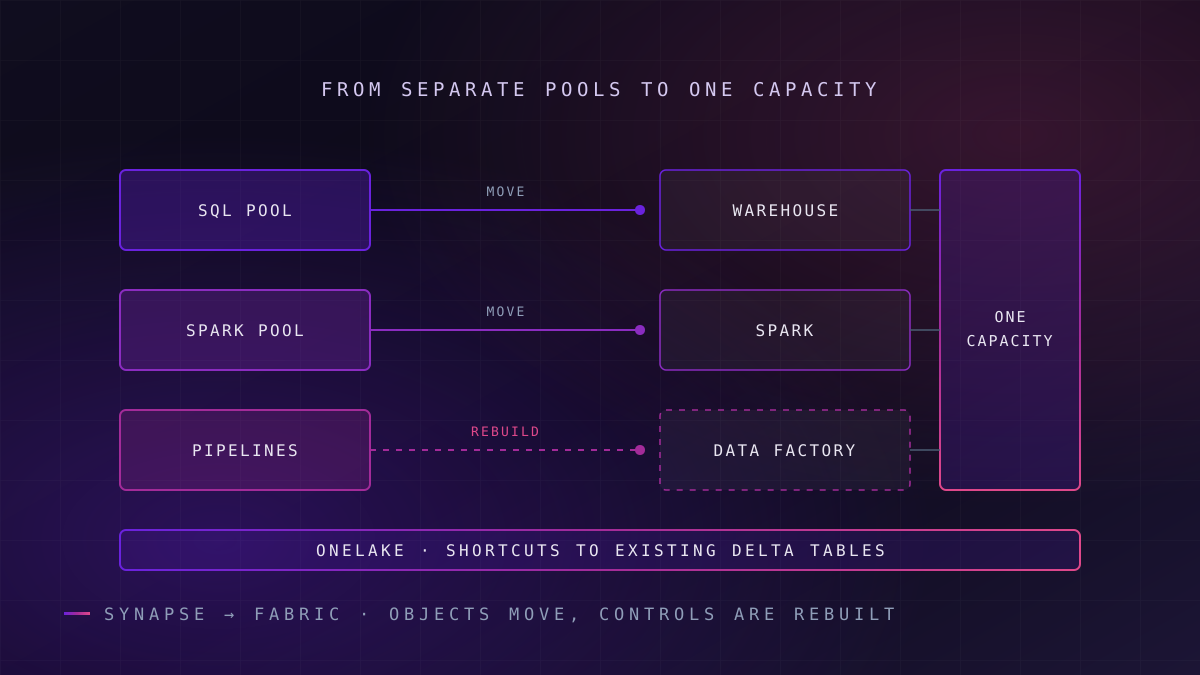
Moving from Azure Synapse Analytics to Microsoft Fabric is a copy-and-adapt migration, not an in-place upgrade. Dedicated SQL pools, Spark items and pipelines each have a Microsoft migration tool, but security, networking, Spark libraries and unsupported T-SQL need rework. The capacity model changes how cost and contention behave, so finance should settle it before engineering starts.
Microsoft's documentation now sets out a concrete Synapse-to-Fabric path. Its Fabric migration guidance lists a Migration Assistant for Fabric Data Warehouse that takes a dedicated SQL pool as a source, a guided Spark migration workflow, and a "Migrate to Fabric" option in the Synapse Integrate hub for pipelines.
The Spark and pipeline experiences are both labelled preview in Microsoft's documentation as of October 2026, which matters for anyone planning production cutover dates around them.
Failure mode
A migration tool is not a migration plan
Each assistant moves the objects it recognises and reports the rest. The reported remainder, plus everything no assistant touches, such as network isolation, identities and capacity sizing, is where the effort and the risk sit.
One Synapse component has already gone. Microsoft's documentation states that Azure Synapse Analytics Data Explorer (Preview) was scheduled for retirement on 7 October 2025, after which its workloads are deleted, with Eventhouse in Fabric as the recommended destination. The migration guides for dedicated SQL pools and Spark pools cited in this article describe a path, not a deadline, so the pressure on most Synapse estates is commercial and strategic rather than a retirement clock.
What follows is a component-by-component account written for the CTO or Head of Data who has to sign the plan: what moves cleanly, what gets rebuilt, the capacity questions finance must answer first, how the security model changes, and when Fabric is the wrong destination.
What a Synapse-to-Fabric Migration Actually Involves
The phrase is often used as if Fabric were the next version of Synapse, and the move a product upgrade. It is not. Synapse is an Azure PaaS workspace in which SQL and Spark compute is organised as pools; Microsoft Fabric is Microsoft's SaaS analytics platform, in which every workload draws on a shared capacity and stores data in OneLake, its single logical data lake.
Microsoft's own Spark migration overview describes the move as usually a copy-and-adapt process rather than a direct in-place move. Items are recreated in a Fabric workspace, data is either referenced or copied, and behaviour has to be validated because the engines, defaults and security boundaries differ.
A precise definition, then: a Synapse-to-Fabric migration is the re-creation of Synapse SQL, Spark and pipeline workloads as Fabric items on a capacity, with data exposed to OneLake by shortcut or copy, and with security, networking and cost controls redesigned for a shared-capacity SaaS model. The last clause is the easiest one for a migration plan to underestimate.
Synapse to Fabric Component Mapping
What this means for you: read the last column first; it tells you what to test on your own workspace before you commit a date to anyone.
| Synapse feature | Fabric equivalent | Migration effort | What to check first |
|---|---|---|---|
| Dedicated SQL pool | Fabric Data Warehouse, via the Migration Assistant (DACPAC upload or direct connection) and a Copy job for data | Medium | Columns using datetimeoffset, external tables, multi-statement table-valued functions, IDENTITY columns, SQL-authenticated users |
| Serverless SQL pool | Lakehouse SQL analytics endpoint over OneLake shortcuts | Medium to high; no dedicated assistant is listed | The endpoint is read-only and only discovers Delta tables in the Tables area, so queries over raw CSV or Parquet need redesign |
| Spark pools, notebooks, Spark job definitions, lake databases | Fabric Spark custom pools, environments, notebooks, lakehouse schemas | Low to medium, using the Spark migration workflow (preview) | Workspaces behind a virtual network, Spark configurations and custom libraries, .NET for Spark, GPU pools, external Hive Metastore |
| Synapse pipelines | Data Factory pipelines in Fabric | Low to medium, using Migrate to Fabric (preview) | Linked service to connection mapping, global parameters, triggers that need rebuilding as per-pipeline schedules, Mapping Data Flows |
| ADLS Gen2 primary storage | OneLake shortcuts, or a copy into OneLake | Low | Whether data is Delta (Tables area) or raw files (Files area) |
| Data Explorer pools | Eventhouse in Real-Time Intelligence | Retirement was scheduled for 7 October 2025 | Whether any workload still depends on it |
| Workspace RBAC, managed VNet, data exfiltration protection | Workspace roles, OneLake security, managed VNet, outbound access protection | Rebuild | Who currently holds workspace-wide access, and which network controls an auditor relies on |
The pattern in the table is consistent. Objects move with tooling; everything that defines who can reach the objects, over which network, at what cost, is redesigned by hand.
What Moves Cleanly from Synapse to Fabric
What this means for you: if your workspace is mostly well-modelled SQL, Delta tables and straightforward pipelines, most of the object migration can be tool-assisted.
Dedicated SQL pools to Fabric Data Warehouse
The Migration Assistant copies metadata and data from the source and converts the schema to Fabric Data Warehouse. Microsoft's documentation lists the captured objects as tables, views, functions, stored procedures and security objects, including roles, permissions and dynamic data masking. Data is then copied with a Copy job in Fabric Data Factory.
Where conversion fails, the assistant's Fix problems step groups failed scripts into primary and dependent objects and can use Copilot to suggest fixes, which Microsoft says should be verified before running. Indexes and transparent data encryption are listed as no longer needed in Fabric Data Warehouse, because the service manages those optimisations and encryption itself.
Spark pools become configuration templates
The Spark migration workflow moves Spark pools, notebooks, Spark job definitions and lake databases, mapping lake databases to lakehouse schemas and creating OneLake catalog shortcuts for managed Delta tables. It does not move data.
In Synapse a Spark pool is a compute boundary; in Fabric it is a template, and the capacity is the boundary.
That difference changes concurrency planning. Microsoft's comparison states that Fabric Spark parallelism is limited by total capacity vCores, at a conversion of 2 Spark vCores per capacity unit, rather than by a pool's node count. A Spark-heavy Synapse estate therefore needs its concurrency re-sized against the capacity, not copied from the old pool settings.
Pipelines and data
The pipeline assessment classifies each pipeline as Ready, Needs review, Coming soon or Not compatible, and migrated pipelines arrive with triggers disabled. Microsoft advises migrating Spark items first, so that notebook and Spark job definition activities map to real Fabric items instead of being left deactivated.
Data is often the easiest part. Delta tables in ADLS Gen2 can be exposed through a shortcut in the lakehouse Tables area without copying, and Fabric registers them in the lakehouse automatically. This is the natural point to impose a medallion architecture if the Synapse lake did not have one, because the shortcut layout becomes the layout every Fabric workload reads.
What Has to Be Rebuilt
What this means for you: these items carry most of the unplanned effort in a Synapse migration, so price them before the business case is approved.
Spark features Fabric does not offer
Microsoft lists .NET for Spark, GPU-accelerated pools and an external Hive Metastore as unsupported in Fabric. C# jobs move to Python or Scala, and metadata moves into the lakehouse.
Identity and encryption in the warehouse
SQL-authenticated users must be replaced with Microsoft Entra identities, and column-level encryption needs another control, such as application-layer encryption or dynamic data masking.
Pipeline plumbing
Linked services become Fabric connections, global parameters become variable libraries, and shared triggers become per-pipeline schedules. Mapping Data Flows move to Dataflow Gen2 only where the preview upgrade supports them.
Libraries, configurations and network isolation
The Spark workflow does not migrate Spark configurations, custom libraries or workspaces behind a virtual network. Environments, private links and outbound rules are configured again in Fabric.
T-SQL deserves a specific warning. Microsoft states that there is not yet full T-SQL compatibility between the source and Fabric warehouses, and lists external tables and multi-statement table-valued functions among unsupported features. Data types change too: datetimeoffset has no direct equivalent, so the offset has to be stored in a separate column.
A code assessment of your stored procedures, run before the migration date is set, is the cheapest risk reduction available. The objects that fail it are usually the ones carrying business logic nobody has documented.
The Capacity Questions Finance Must Settle First
What this means for you: Fabric changes how a bill behaves under load, so the commercial model has to be agreed before workloads are moved, not discovered afterwards.
In Synapse, a dedicated SQL pool's compute is billed separately from storage and can be paused to stop compute charges. Fabric bills a capacity, an F SKU measured in capacity units, which every workload in its assigned workspaces draws on.
Microsoft describes F capacities as billed per second through Azure with no commitment, with an optional yearly reservation. Prices vary by region and change over time, so model them against Microsoft's live Fabric pricing page rather than a figure in a slide.
Key idea
Smoothing changes what a spike costs
Fabric smooths interactive operations over five to 64 minutes and background operations over 24 hours. A heavy overnight load is spread across the following day, which protects it from throttling but also means it competes with daytime reporting for the same capacity.
Throttling follows four stages in Microsoft's documentation: overage protection, a 20-second delay on new interactive operations, rejection of interactive operations, and finally rejection of all new requests. Microsoft also notes that it classifies almost all warehouse operations as background, so a migrated warehouse feeds the 24-hour window rather than the interactive one. The questions below need an owner and an answer before the first workload moves.
- How many capacities, split by what? One shared capacity is simple to buy; separate capacities for engineering and reporting stop a runaway job degrading finance dashboards.
- Who views Power BI content, and on which SKU? On F SKUs below F64, every Power BI viewer needs a Pro, Premium Per User or trial licence; at F64 and above, free users with a viewer role can view content.
- Pay-as-you-go, reservation, or both? A reservation suits steady base load; per-second billing suits migration waves and parallel running.
- Is Spark on the shared capacity or billed separately? With Autoscale Billing for Spark enabled, Microsoft states that Spark runs pay-as-you-go and bursting and smoothing no longer apply to it.
- What happens during parallel running? Both platforms are billed while you reconcile, so budget the overlap explicitly.
Pausing also behaves differently from Synapse. Microsoft notes that pausing a capacity creates a billing event for accumulated future usage, so pause-overnight habits carried over from dedicated SQL pools need rechecking. The wider discipline of tagging, chargeback and right-sizing is a FinOps practice, and our guide to cloud cost optimisation economics sets it out.
How Security and Governance Change in Fabric
What this means for you: Synapse access controls do not translate one-to-one, and the gap between them is where an audit finding is most likely.
Workspace roles are broad by design
Fabric workspace roles apply to every item in the workspace. Microsoft's warehouse security guidance recommends assigning Admin, Member and Contributor roles only to people actively building the solution, and giving everyone else the Viewer role or item permissions plus T-SQL grants on specific objects. Synapse workspaces that grew permissive over several years should be redesigned, not copied.
Inside the warehouse, Fabric supports object-level security, column-level security, row-level security with WHERE-clause predicates, and dynamic data masking. Those controls migrate conceptually from a dedicated SQL pool, and the Migration Assistant carries most security objects across.
Failure mode
SQL security does not follow the data into Spark
Microsoft states that security rules set on a lakehouse SQL analytics endpoint apply only when data is accessed through that endpoint, not through Spark or other tools. Row-level security on the endpoint is therefore not a control over the lake.
Purview, the OneLake catalog and network controls
Microsoft positions the OneLake catalog as the primary Fabric experience for discovery, endorsement, domains and lineage. Microsoft Purview adds sensitivity labels that can be set on all Fabric items, data loss prevention policies for lakehouses, warehouses and semantic models, and an audit log of Fabric user activity. For a regulated estate, that combination usually covers more of the compliance perimeter than Synapse did, but only once labels and policies are actually configured.
On the network side, Microsoft's comparison maps Synapse private links, managed virtual networks and data exfiltration protection to Fabric private links, managed virtual networks, workspace IP firewall rules and outbound access protection. Keeping these controls under version control, as described in governance as code, stops them drifting between environments, and our security and compliance engineering work starts from the controls your auditor already tests.
For comparison, Databricks expresses fine-grained access in Unity Catalog through row filters, column masks and attribute-based access control policies attached at catalog or schema level. That is one reason security-led teams evaluate it alongside Fabric.
When Fabric Is the Wrong Destination
What this means for you: if any of these four describes your estate, a later or different move is likely to cost less than a migration started now.
Fabric is the wrong next step in four situations, and staying on Synapse for now is a legitimate answer in at least two of them.
The first is a Spark estate built on features Fabric does not offer: GPU-accelerated pools, .NET for Spark, or an external Hive Metastore that other engines share. Rewriting those is a programme in its own right, not a migration step.
The second is an estate whose centre of gravity is machine learning or code-first engineering across clouds. There the real question is the platform, not the migration, and our Fabric versus Databricks decision framework covers it in depth. Moving Synapse workloads to Fabric first and then to Databricks pays for two migrations.
In practice
Standing still can be the right call
A stable dedicated SQL pool with no Power BI consolidation pressure and no budget for capacity redesign can reasonably stay where it is while Spark and pipeline tooling leaves preview. Record that as a dated decision with a review point, not as drift.
The third is an organisation that cannot yet answer the capacity questions above. Moving workloads before chargeback and isolation are agreed tends to produce the first throttling incident, and the cost argument, in the same month.
The fourth is a migration being pushed mainly by licensing arithmetic. If the case rests on a bundle discount rather than on Power BI consolidation, reduced pipeline sprawl or a governance gain, it is worth testing whether the discount survives a modelled month of real workloads.
Sequencing a Synapse-to-Fabric Migration
What this means for you: the safest order is the one Microsoft's tools imply, with commercial decisions placed before any workload moves.
The work does not need to start as a multi-year programme. A first production wave, scoped to one domain's data, its Spark jobs, its pipelines and the reports that read them, typically moves in weeks rather than quarters; repeating that across a large estate is the multi-quarter part.
- Inventory and assess. Run the pipeline assessment, a T-SQL code assessment of the dedicated pool, and an inventory of Spark pools, libraries and network settings. A migration factory approach turns those outputs into dependency-ordered waves.
- Settle the capacity model. Agree capacity count, SKU, reservation strategy and the Power BI licence position, as part of a governed cloud platform design with tagging and chargeback.
- Expose data before moving compute. Shortcut existing Delta Lake tables into OneLake so Synapse and Fabric read the same data during parallel running.
- Move Spark items, then pipelines. Microsoft's guidance is explicit that Spark items go first so pipeline activities map correctly.
- Migrate the warehouse. Use the Migration Assistant, fix the reported objects, copy the data, and reconcile row counts and totals against the source.
- Cut over reporting last. Repoint Power BI only once reconciliation holds, then retire Synapse resources wave by wave.
After cutover, performance work shifts to Fabric's own levers, such as V-order and file layout, which our note on lakehouse performance tuning covers. If the migration also exposes a fragmented target design, a data architecture review is the right place to resolve it before the second wave.
Commit the capacity model before the first workload moves, or the first throttling incident will write it for you.
Frequently Asked Questions
Is Azure Synapse Analytics being retired?
Azure Synapse Analytics Data Explorer (Preview) was scheduled for retirement on 7 October 2025, according to Microsoft's documentation, with Eventhouse in Fabric as the recommended replacement. Microsoft's migration guides for dedicated SQL pools, Spark and pipelines describe how to move to Fabric but do not set a retirement date for those components. Check Azure updates for the current status of the specific Synapse features your workloads use.
Can dedicated SQL pools migrate to Fabric automatically?
Partly. Microsoft's Migration Assistant for Fabric Data Warehouse converts schema and migrates tables, views, functions, stored procedures and most security objects from a dedicated SQL pool, then copies data with a Copy job. Objects it cannot convert, such as external tables, multi-statement table-valued functions or SQL-authenticated users, are reported for manual fixing, with optional Copilot suggestions that should be verified.
What does not carry over from Synapse Spark to Fabric?
Microsoft lists GPU-accelerated pools, .NET for Spark and an external Hive Metastore as unsupported in Fabric Spark. The preview Spark migration workflow also does not move Spark configurations, custom libraries, non-Delta tables or workspaces behind a virtual network. Those items are rebuilt manually using Fabric environments, Python or Scala code, and lakehouse metadata.
How does Fabric capacity pricing differ from Synapse?
In Synapse, each dedicated SQL pool's compute is scaled, paused and billed on its own. Fabric bills a shared capacity, an F SKU measured in capacity units, that every workload in assigned workspaces draws on, with per-second billing or an optional reservation. Smoothing spreads background jobs over 24 hours, and throttling applies when the capacity is overloaded. Microsoft publishes current regional prices on its Fabric pricing page.
Should we migrate Synapse to Fabric or to Databricks?
Choose Fabric when Power BI is the main consumption layer and the team works mostly in SQL and low-code tools. Consider Databricks when machine learning, code-first engineering or multi-cloud portability dominate. Avoid moving to Fabric first and then Databricks, which pays for two migrations. Some estates stay on Synapse temporarily while migration tooling leaves preview.
Unolabs is a Data and AI first engineering consultancy, headquartered in the United Kingdom with engineering operations in Pune and active engagements across the UK, Australia, and Hong Kong. We help enterprises build the architectural foundation for autonomous AI execution — governed data platforms, semantic intelligence, and agentic systems that enterprises can stand behind.
If you are weighing whether and when to move your Synapse workspace to Microsoft Fabric, book a discovery call and we will work through it with you.
More Where
This Came From.
New architectural deep-dives land every two weeks. Pick your channels and we will send them as they publish.
Continue reading
- Cloud Platform EngineeringGovernance as Code: Automating Data Quality in the CloudTurn data quality rules, access policies, and data contracts into version-controlled artefacts that CI/CD enforces before bad data reaches consumers.13 min read
- Cloud Platform EngineeringPlatform Engineering and DataOps Culture: Turning Tool Sprawl into a Paved RoadHow platform teams turn data tool sprawl into a self-service platform: seven pillars, six capabilities, and the operating model that makes adoption stick.14 min read
- AI Readiness & StrategyThe Agent Tax: Why Replacing Your RPA Bots with AI Agents Could Blow Up Your Automation BudgetSwapping RPA bots for AI agents turns a fixed automation cost into one that scales with volume. The four cost lines most business cases leave out.14 min read
Map your Synapse workspace before you buy capacity
We will run your SQL pools, Spark items and pipelines through the mapping table above and tell you which move with Microsoft's tools, which need rebuilding, and what capacity questions are still open.
Book a Synapse Migration Review