Data Platform Strategy
Power BI vs Tableau vs SAP Analytics Cloud: Choosing an Enterprise BI Platform
Power BI, Tableau or SAP Analytics Cloud? Compare licensing structure, semantic models, governance, SAP data fit, AI assistants and migration effort.
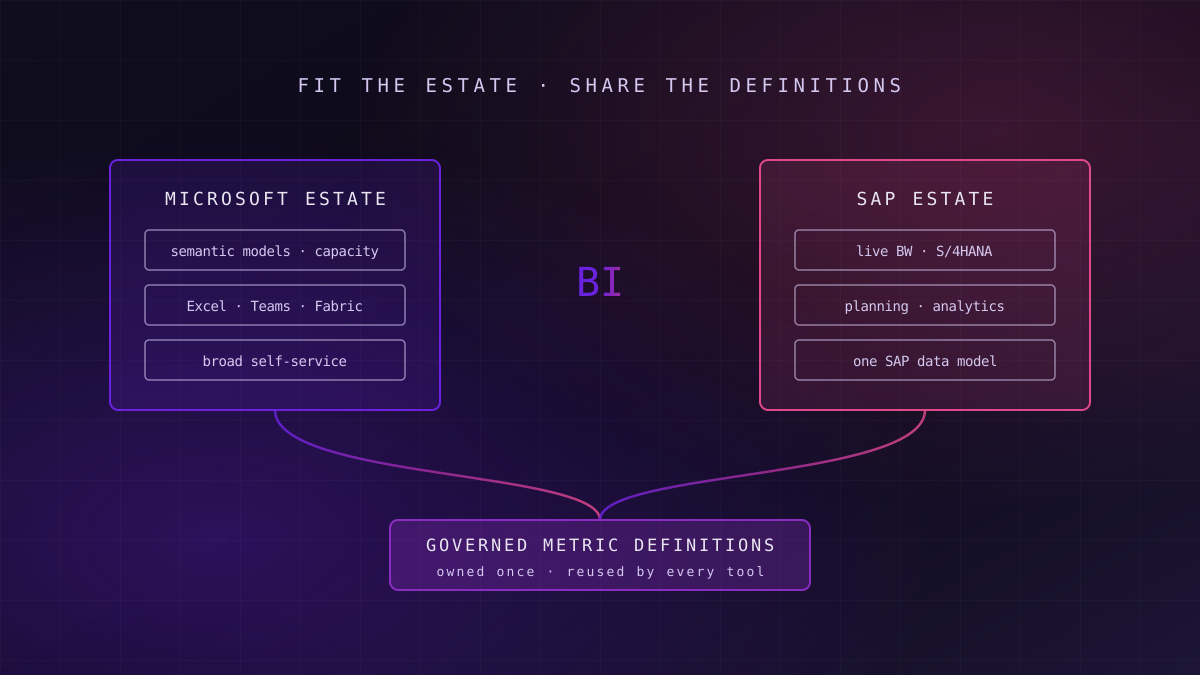
Choose Power BI when the estate is Microsoft-centred and broad self-service matters most. Choose SAP Analytics Cloud when SAP BW or S/4HANA is the main source and planning sits beside analytics. Choose Tableau when visual exploration and Salesforce integration lead. In every case, the governed metric definitions matter more than the tool.
Most BI platform comparisons rank visual features and price per seat. Neither decides whether the platform still works three years later. What decides it is where your data lives, who builds reports, how definitions are governed, and how much it costs to move the estate you already have.
Why the BI Platform Decision Is Back on the Table
What this means for you: the vendors have changed what they are selling, so a decision made five years ago may rest on assumptions that no longer hold.
Each of the three platforms now sits inside a larger estate strategy. In June 2019, Salesforce agreed to buy Tableau for a reported $15.7 billion, and in the same month Google agreed to buy Looker for a reported $2.6 billion. Business intelligence stopped being a standalone market and became a way into a wider cloud or application estate.
Microsoft made the same move from the other direction. When Microsoft Fabric reached general availability in November 2023, Power BI datasets were renamed semantic models, reflecting a shift from report tool to one workload in a unified analytics platform. SAP has positioned SAP Analytics Cloud alongside SAP Datasphere in its Business Data Cloud portfolio, so analytics and planning sit close to SAP's own data model.
A BI platform is now sold as the front door to an estate, and the estate is what you are really choosing.
The second change is AI. Each vendor ships a natural-language assistant: Copilot in Power BI, Tableau's agentic features, and SAP's Joule across SAP Analytics Cloud. These assistants are only as reliable as the definitions beneath them, which is why the semantic layer now carries more of the decision than the visualisation layer does.
What Each Platform Actually Is
What this means for you: compare the platforms as operating models, not as chart galleries, because that is where the year-two cost sits.
Power BI is Microsoft's business intelligence service. Reports are built on semantic models, which hold tables, relationships and measures written in DAX, and are published to workspaces in the Power BI service, now part of Microsoft Fabric. Its reach comes from integration with Excel, Teams and Microsoft 365 identity.
Tableau is Salesforce's analytics platform, known for visual exploration. Analysts build workbooks on published data sources, either live connections or extracts, and share them through Tableau Cloud or Tableau Server. Its newer features add metric tracking and agent-driven analysis, increasingly tied to the Salesforce platform.
SAP Analytics Cloud is SAP's cloud service for analytics and planning in one product. Its distinctive strength is live connection to SAP BW, BW/4HANA, S/4HANA and Datasphere, which keeps SAP's business semantics and authorisations in place rather than copying data out.
| Dimension | Power BI | Tableau | SAP Analytics Cloud | What it means for your decision |
|---|---|---|---|---|
| Natural home | Microsoft 365 and Fabric estates | Salesforce and mixed estates | SAP-centred estates | Start from where most of your data and users already are |
| Semantic layer | Semantic models with DAX measures | Published data sources and metrics | SAP models, or live SAP queries | Decides where metric definitions are governed |
| SAP data fit | Connectors, usually via extracts | Connectors, usually via extracts | Live connection, SAP authorisations kept | Decides whether SAP logic is rebuilt or reused |
| Planning | Separate tools or partners | Separate tools | Built in | Matters only if planning shares the same platform |
| Licensing structure | Per user, or Fabric capacity | Per user by role | Per user, or within SAP bundles | Decides which cost you must control |
| AI assistant | Copilot in Power BI | Tableau agentic features | Joule | Only as good as the definitions underneath |
How the Licensing Structures Fail Differently
What this means for you: each licensing structure is cheap at one shape of usage and expensive at another, so model your own user mix before comparing quotes.
Power BI can be licensed per user, where creators and consumers each hold a licence, or through capacity, where content in a capacity workspace can be read by people without individual licences. Capacity also opens up Fabric workloads, which our Fabric versus Databricks decision guide weighs against the alternative. The failure mode is a capacity sized for peak refreshes that runs half-empty, or a per-user estate that crosses the point where capacity would have been cheaper.
Tableau licenses by role: Creator, Explorer and Viewer. The structure rewards an estate where a small number of authors serve many viewers. The failure mode is role creep, where viewers are upgraded to Explorer for occasional editing and the licence mix drifts upwards without anyone deciding it should.
Failure mode
The real licence risk is the one nobody owns
Every structure drifts. Without a named owner reviewing active users, role assignments and capacity usage each quarter, the licence bill grows faster than adoption. The fix is ownership and a review rhythm, not a better negotiation.
SAP Analytics Cloud is licensed per user, with different licence types for analytics and planning, and SAP increasingly sells it inside larger bundles. The failure mode is buying it as part of a bundle without a plan for the planning and analytics users who will actually use it, which leaves paid capacity idle.
None of these structures is cheaper in general. A finance team of 60 planners on SAP, a sales organisation of 5,000 dashboard readers in Salesforce, and a Microsoft-wide self-service programme produce three different answers from the same price list.
Semantic Models and Where Governance Lives
What this means for you: if two dashboards show two revenue figures, the problem is the definitions, and no platform change fixes that on its own.
Every enterprise BI estate eventually hits the same failure: the same metric defined differently in different reports. Each platform offers a place to hold definitions once. In Power BI it is a shared semantic model that many reports reuse. In Tableau it is a certified published data source, and increasingly its metrics layer. In SAP Analytics Cloud it is the SAP model, or the BW and Datasphere models it connects to live.
The design choice is whether definitions live inside the BI tool or below it. Definitions inside the tool are fast to build and easy for analysts to own, but they are locked to that tool. Definitions below it, in a governed warehouse or a separate layer, serve every tool and every AI assistant but take more engineering. Our guide to what a semantic layer is and when you need one sets out where each option fits.
Key idea
Govern the definitions, then choose the canvas
The decision that lasts is where revenue, margin and headcount are defined and who owns each definition. A BI platform chosen before that decision inherits whatever inconsistency already exists, and its AI assistant repeats it confidently.
Certification matters as much as structure. Each platform lets an owner mark a model or data source as trusted. Used properly, certification separates governed content from personal exploration. Used loosely, it becomes a badge on everything, and readers learn to ignore it. A working data governance model names who can certify and what the certification promises.
SAP Data and the Live-Connection Question
What this means for you: if SAP is your main source, the question is whether you reuse SAP's logic live or rebuild it outside SAP, and that choice drives most of the effort.
SAP Analytics Cloud's live connections query SAP BW, BW/4HANA, S/4HANA and Datasphere directly, so hierarchies, currency conversion, authorisations and calculated key figures are reused rather than rebuilt. For SAP-heavy finance and supply chain reporting, that reuse is the main reason to choose it.
Power BI and Tableau can connect to SAP sources, but in most enterprise estates the practical pattern is to extract SAP data into a warehouse or lakehouse and model it there. That works well when SAP is one source among several, and when a team can rebuild SAP semantics accurately. It works badly when report logic depends on SAP hierarchies and authorisations that nobody has documented outside BW.
Readiness signal
Readiness signal: can you list your SAP calculations?
If you can name the BW queries, hierarchies and authorisation rules your reports depend on, rebuilding them outside SAP is a scoped project. If you cannot, a live connection buys time while you find out.
The SAP roadmap adds pressure. SAP BW 7.5 leaves mainstream maintenance at the end of 2027, so many SAP estates are choosing a reporting front end and a warehouse destination in the same window. Our playbook for protecting analytics through the S/4HANA conversion covers that sequencing, and estates still running BusinessObjects should read our guide to SAP BusinessObjects cloud options first.
AI Assistants, Self-Service and Embedded Analytics
What this means for you: judge each assistant on your own governed model, with your own questions, because demos run on clean data you do not have.
Copilot in Power BI generates report pages, writes and explains DAX, and answers questions over semantic models. Tableau's agentic features focus on conversational analysis and proactive metric insights, with its newest capabilities tied to the Salesforce platform. Joule in SAP Analytics Cloud answers questions across SAP data and is positioned to reach into other SAP applications.
The common constraint is the model. An assistant asked "what was gross margin last quarter" returns whatever the model defines as gross margin. If three models disagree, the assistant gives three answers depending on where it is pointed. That is why AI readiness in BI is mostly semantic-model readiness.
An AI assistant on an ungoverned model does not answer the question; it picks one of your existing disagreements and states it fluently.
Self-service and embedding pull in different directions. Power BI's breadth across Microsoft 365 makes self-service creation easy to start and hard to govern. Tableau is strong for analyst-led exploration. All three support embedding analytics in other applications, with licensing that needs separate modelling for external users. Teams building data visualisation and dashboards should test embedding on a real application early.
The Decision Matrix
What this means for you: score your estate on each row; where most rows lean to one platform, the decision is usually clear, and a split usually means two genuine estates.
| Dimension | Lean Power BI when | Lean Tableau when | Lean SAP Analytics Cloud when | Signal you have scored it honestly |
|---|---|---|---|---|
| Main data source | Azure, Fabric or mixed warehouse | Salesforce or mixed warehouse | SAP BW, S/4HANA or Datasphere | You counted reports by source, not systems by name |
| Report builders | Business users across Microsoft 365 | Specialist analysts | SAP-literate finance and planning teams | You named who builds reports today |
| Planning need | Low, or handled elsewhere | Low, or handled elsewhere | Planning shares the same data | You listed the planning processes in scope |
| Governance model | Shared semantic models | Certified data sources and metrics | SAP models and authorisations | You named the owner of each core metric |
| Licence shape | Many readers, capacity-friendly | Few authors, many viewers | SAP user base already licensed | You modelled active users, not headcount |
| AI ambition | Copilot across Microsoft 365 | Agentic analysis in Salesforce | Joule across SAP applications | You tested on your own model |
| Migration load | Existing Excel and Power BI estate | Existing Tableau estate | Existing BusinessObjects or BW estate | You inventoried what already runs |
Looker and Qlik deserve a note. Looker suits code-first teams that want definitions in a modelling language under version control, particularly on Google Cloud. Qlik suits associative exploration and has broadened into data integration. Both belong on a shortlist when the matrix does not settle cleanly.
When Consolidating BI Tools Is the Wrong Goal
What this means for you: one tool is a reasonable goal for a single estate, and an expensive one for an organisation that genuinely has two.
Consolidation is usually justified by licence savings and simpler training. It is the wrong goal when an SAP-centred finance function and a Microsoft-centred commercial function both depend on the platform that fits their data. Forcing either onto the other's tool means rebuilding SAP semantics outside SAP, or asking sales teams to work in an SAP-first interface, and the migration cost can exceed years of licence savings.
Consolidate when
One estate dominates, the second tool serves a small or shrinking group, and its reports can be rebuilt on governed models without losing logic.
Keep two when
Two large user groups depend on two different data estates, and each tool fits its estate. Govern definitions once and let both tools consume them.
Defer when
The warehouse or SAP roadmap is still moving. Choosing the front end before the back end often means migrating twice.
The cost to watch in a two-tool estate is divergence, not licences. If finance and sales report revenue from different models, the second tool becomes a second version of the truth. Shared definitions below both tools contain that risk, and the data analytics engineering behind them is where the effort belongs.
Where to Start: A Six-Week BI Platform Review
What this means for you: a short evidence-led review settles the choice and sizes the migration before any contract is signed.
Weeks one and two: inventory the estate. Count reports, users, data sources and refresh schedules, and find which reports were used in the last 90 days. Most estates carry a long tail of reports nobody opens, and excluding them changes the migration estimate more than any platform feature.
Weeks three and four: identify the twenty metrics the business runs on, find where each is defined today, and decide where each will be governed. Then build one representative report on each shortlisted platform, against your own data, including at least one SAP-sourced report if SAP matters.
Weeks five and six: model licence cost on active users, size the migration of the reports that survive the usage cut, and test the AI assistant on the governed model. The output is a written decision with the evidence behind it, which then shapes the data strategy and, where SAP is involved, the SAP BusinessObjects modernisation route.
Frequently Asked Questions
Is Power BI better than Tableau for enterprise reporting?
Neither is better in general. Power BI fits Microsoft-centred estates where many business users build and read reports, and it integrates with Excel, Teams and Microsoft Fabric. Tableau fits analyst-led visual exploration and Salesforce-centred estates. The deciding factors are where the data lives, who builds reports, how metric definitions are governed, and the shape of the licence mix across authors and readers.
When should we choose SAP Analytics Cloud?
SAP Analytics Cloud fits when SAP BW, BW/4HANA, S/4HANA or Datasphere is the main data source and when planning should share the same data as analytics. Its live connections reuse SAP hierarchies, currency logic and authorisations rather than rebuilding them. It is a weaker fit when most data comes from non-SAP systems and the users work mainly in Microsoft or Salesforce tools.
Can Power BI connect to SAP BW and S/4HANA?
Yes, Power BI has connectors for SAP BW and SAP HANA-based sources. In most enterprise estates, though, SAP data is extracted into a warehouse or lakehouse and modelled there, because query performance and SAP-specific logic such as hierarchies and authorisations are easier to manage that way. That rebuild is a real cost, and it should be sized before choosing Power BI for SAP-heavy reporting.
Should we consolidate onto a single BI tool?
Consolidate when one data estate dominates and the second tool serves a small group whose reports can be rebuilt without losing logic. Keep two tools when two large user groups depend on two different estates, such as SAP finance and Microsoft-based sales. In that case, govern metric definitions once below both tools so the two platforms do not report different numbers for the same measure.
How do AI assistants change the BI platform choice?
Copilot in Power BI, Tableau's agentic features and Joule in SAP Analytics Cloud all answer questions over the semantic model beneath them. If that model defines a metric inconsistently, the assistant repeats the inconsistency. AI assistants therefore raise the value of governed, certified definitions more than they change which platform to choose. Test each assistant on your own governed model, not on vendor demo data.
Unolabs is a Data and AI first engineering consultancy, headquartered in the United Kingdom with engineering operations in Pune and active engagements across the UK, Australia, and Hong Kong. We help enterprises build the architectural foundation for autonomous AI execution — governed data platforms, semantic intelligence, and agentic systems that enterprises can stand behind.
If you are weighing Power BI, Tableau or SAP Analytics Cloud, or whether to consolidate onto one, book a discovery call and we will work through it with you.
More Where
This Came From.
New architectural deep-dives land every two weeks. Pick your channels and we will send them as they publish.
Continue reading
- Data Platform StrategyBig Data Analytics in Retail: The Five Use Cases That Pay Back, and What Each One Needs FirstBig data analytics in retail pays back in five places. What each use case needs, where it stops paying off, and the platform UK retailers build first.14 min read
- Data Platform StrategyHow to Choose a Data and AI Consultancy: A Buyer's ChecklistA vendor-neutral checklist for choosing a data and AI consultancy: the questions to ask, the evidence to demand, the red flags, and how to test the exit.13 min read
- Data Platform StrategyHow to Sequence a Data and AI Roadmap: What Goes First, and What WaitsHow to sequence a data and AI roadmap: decisions first, then foundations, platform and AI, funded in waves over 90 days, 12 months and 24 months.14 min read
Choose your BI platform on evidence, not demos
We will score your report estate, data sources and user mix against the seven dimensions above and tell you which platform fits, and whether consolidating is worth it.
Book a BI Platform Review