SAP Modernisation
Moving SAP Data Intelligence Pipelines to SAP Datasphere: A Step-by-Step Migration
How to move SAP Data Intelligence graphs to SAP Datasphere replication and transformation flows: inventory, mapping, delta, reconciliation and cut-over.
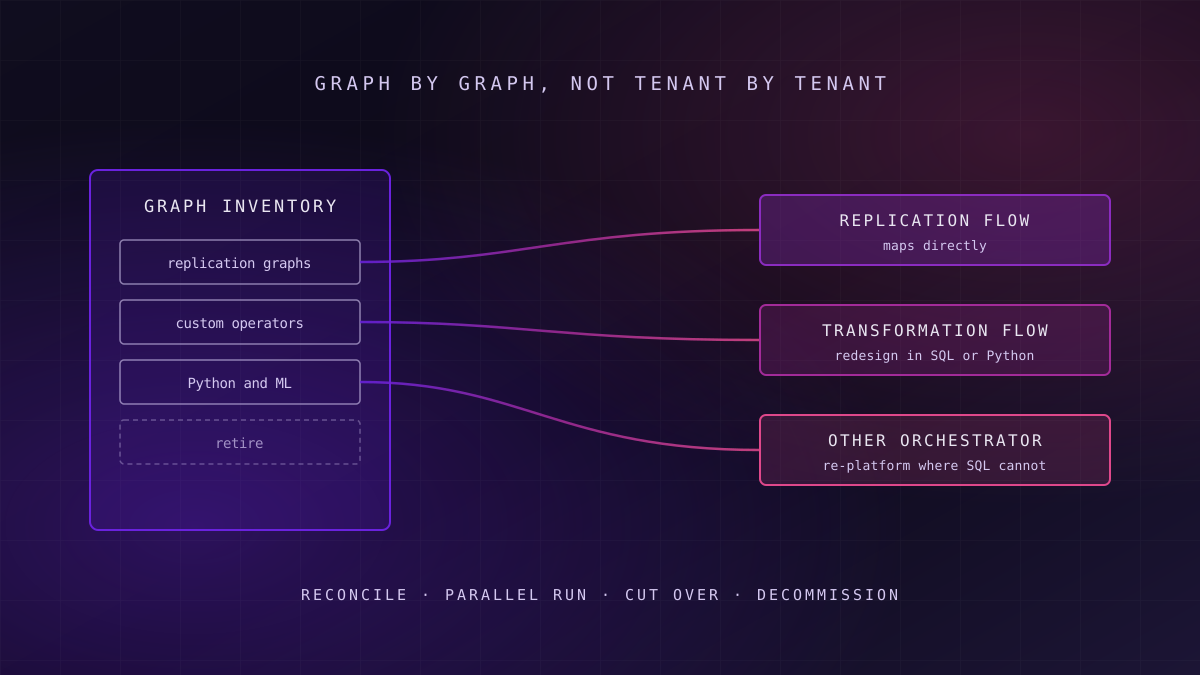
Moving SAP Data Intelligence to SAP Datasphere is a graph-by-graph job. Replication graphs map onto Datasphere replication flows with little change. Graphs built on custom operators, Python or machine learning need redesign as transformation flows, or a different orchestrator. Every graph then needs reconciliation and a parallel run before the old one is switched off.
The decision about whether and when to move is covered in our assessment of SAP Data Intelligence options after 2026. This article assumes that decision is made and some or all of the estate is heading to SAP Datasphere. What follows is the sequence that gets it there without breaking the reports that depend on it.
Why a Lift-and-Shift Does Not Exist
What this means for you: budget for redesign from the start, because the tooling will not convert your graphs for you.
SAP Data Intelligence is a general-purpose pipeline engine. Graphs can chain any operator, run arbitrary Python or Go, call external services and train models. SAP Datasphere, SAP's cloud data-warehousing and data-integration service, is narrower by design: it moves data with replication flows, transforms data already stored with transformation flows, and orchestrates both with task chains.
Key idea
There is no graph converter
SAP's own transition guidance describes the move as a redesign rather than a one-to-one technical migration, because the two products do not have feature parity. Plan each graph's destination individually.
That narrowing is the point. Fewer moving parts mean less to operate and patch. But it also means some of what your graphs do today has no Datasphere equivalent and must either be rebuilt differently or leave the SAP stack.
The good news is that one kind of graph, and usually the largest group, has a close equivalent. Replication flows were introduced in SAP Data Intelligence Cloud in February 2022 and in SAP Datasphere in March 2023, according to SAP's replication flow documentation. The engine underneath is shared heritage, so replication logic moves more cleanly than anything else.
Step 1: Inventory Every Graph and Classify It
What this means for you: the inventory decides the size of the programme, so do it from the tenant, not from memory.
Export the full list of graphs from each SAP Data Intelligence tenant, with their schedules, last successful run, owner and downstream consumers. Graphs that have not run for months, or that feed nothing anyone opens, are candidates for retirement rather than migration. In our engagements, a meaningful share of graphs in a mature tenant turn out to have no active consumer.
Then classify each live graph by what it actually does, not by its name.
Replicate
The graph copies tables or CDS views from a source to a target, with or without delta. These map onto Datasphere replication flows.
Redesign
The graph transforms data with standard operators, SQL or modest Python. These become transformation flows and task chains.
Re-platform
The graph relies on custom operators, external calls, complex Python or model training. These move to a non-SAP orchestrator or platform.
Record for each graph the source system and object, the target, the load pattern (full, delta, event), the volume, the latency the business relies on, and every consumer: reports, extracts, downstream graphs, applications. That consumer list is what the testing plan in Step 5 is built from.
Step 2: Map Replication Graphs to Replication Flows
What this means for you: this is the quickest win, so move replication first and let it fund confidence for the harder routes.
A Datasphere replication flow copies one or more datasets from a source connection to a target, as an initial load on its own or as an initial load followed by continuous delta where the source supports it. Datasphere's replication flows use the embedded data-integration engine and its connectors rather than the Data Provisioning Agent that older Datasphere remote tables rely on, which removes an on-premise component to install and patch.
For each replication graph, confirm three things before building the flow:
| Check | What to confirm | Why it matters | If it fails |
|---|---|---|---|
| Source object | The source table, CDS view or ODP object is supported by the Datasphere connection type | Unsupported objects cannot be selected in the flow | Expose a supported view or extractor at source, or route the graph to re-platform |
| Target type | The target is a Datasphere local table, a file space, or a supported external target | Non-SAP targets carry an extra licensing requirement | Agree the commercial basis before building, not after |
| Delta behaviour | The source supports delta extraction for that object | Without it the flow can only do repeated full loads | Accept full loads where volumes allow, or add delta at source |
| Latency | The business tolerance matches what replication flows deliver | A graph tuned for very low latency may not be matched exactly | Agree the new latency with consumers in writing |
Non-SAP targets need attention early. Replication into non-SAP targets, such as Amazon S3, Google Cloud Storage, Microsoft Azure Data Lake Gen2, Google BigQuery and Apache Kafka, requires premium outbound integration; check SAP Help for the current target list. An administrator must allocate premium outbound integration capacity in the tenant before such flows can run.
Failure mode
Failure mode: the outbound graph nobody costed
Graphs that push SAP data out to a cloud lake or Kafka look like simple replication, so they are often migrated last and costed least. Those are exactly the flows that need premium outbound integration capacity, and discovering that at cut-over delays the whole wave.
Where replicated data feeds an external platform, the flow is effectively a change data capture feed, and the target must handle inserts, updates and deletes in order. The design choices for consuming that kind of feed are set out in our guide to change data capture methods and tools.
Step 3: Redesign Transformation Graphs as Flows and Task Chains
What this means for you: redesign means rewriting the logic, so treat it as a small software project with tests, not as configuration.
Transformation flows in SAP Datasphere transform data that is already stored, and can run repeatedly, including on deltas. Logic is expressed in SQL views or graphical operators, and a Python script operator accepts a Pandas DataFrame and returns one whose columns, types and order must match the target exactly. Task chains then orchestrate replication flows, transformation flows and other tasks, with dependencies, parallel branches and schedules.
Rewrite Operators as Set-Based Logic
Many SAP Data Intelligence graphs process data operator by operator, row by row, because that was natural in a pipeline engine. In Datasphere the efficient form is set-based: one SQL transformation that does in one statement what a chain of operators did in sequence. Rewriting this way is usually faster at run time and far easier to test.
Keep Python Small and Deterministic
The Python operator is useful for transformations that SQL expresses badly, but it runs inside the data-integration engine with a fixed contract. Lengthy scripts, calls to external services, or anything that installs its own libraries belong on Route 3. If the Python in a graph is the bulk of its value, that is a strong signal it is not a Datasphere workload.
If the Python is the point of the graph, the graph is not a Datasphere workload.
Rebuild Orchestration as Task Chains
Graph schedules and dependencies become task chains. Rebuild them deliberately rather than one-for-one: many estates have accumulated graphs triggered at overlapping times to work around each other's run windows. A task chain that expresses the real dependency removes those workarounds, and the failures they caused.
Step 4: Decide What Leaves the SAP Stack
What this means for you: some graphs are better rebuilt elsewhere, and saying so early avoids forcing them into a tool that fits badly.
Route 3 graphs share a pattern: they call external APIs, run substantial Python, train or score models, or orchestrate non-SAP systems. These belong on a general-purpose orchestrator or data platform, such as Apache Airflow or a lakehouse platform, where code, tests and deployment are first-class. The enterprise data engineering work then looks like any other pipeline build, and it should be run with proper CI/CD for data pipelines from day one.
The trade-off is that data leaving SAP loses business context unless something carries it across. Decide which semantic layer holds the definitions, and replicate the data with its keys and hierarchies intact rather than as flattened extracts. Where SAP data must reach an external platform, Route 2's replication flow often becomes the feed and the re-platformed logic sits downstream of it.
In practice
In practice: split the graph rather than moving it whole
A single graph often does three jobs: extract, transform and push. Splitting it lets the extract run as a replication flow inside Datasphere and only the code-heavy part move out, which keeps most of the SAP context where it belongs.
Step 5: Test, Reconcile and Run in Parallel
What this means for you: a migrated pipeline is finished when its output matches the old one, not when it runs green.
For every migrated graph, build a reconciliation test before cut-over: row counts by key period, sums of the main measures, and a sample of records compared field by field between the old target and the new. Run old and new side by side for at least one full business cycle, usually a month-end close for finance data, and do not decommission the old graph until the reconciliation has passed for the whole cycle. The practices in our guide to data observability and quality management apply here: test freshness, volume and schema, not only totals.
| Test | Old graph | New flow | Pass condition |
|---|---|---|---|
| Row counts | Per key period | Same periods | Equal, or every difference explained |
| Measure totals | Main amounts and quantities | Same measures | Equal within agreed tolerance |
| Record sample | Selected keys | Same keys | Field-level match |
| Delta behaviour | Changes over a week | Same changes | Inserts, updates and deletes all arrive |
| Downstream outputs | Reports and extracts | Same consumers | Owners sign off |
Delta deserves its own test. Replication flows need an initial load before they can deliver deltas, so plan the switch so that the new flow's initial load and the old graph's last delta line up, or reconcile across the gap. Test deletes explicitly: they are the change type most often lost between systems.
A pipeline that runs green and reconciles wrong is worse than one that fails, because nobody looks at it.
Step 6: Cut Over in Waves and Decommission
What this means for you: waves keep the risk small and let each one teach the next.
Group graphs into waves by source system and consumer, not by route, so that a business area moves as a whole and its reports switch once. A typical first wave is the replication graphs for one well-understood source with willing report owners. Later waves carry the redesign and re-platform graphs that need more testing. A repeatable migration factory approach, with the same templates, tests and sign-off steps each wave, is what turns the first wave's lessons into speed.
For each wave, the cut-over checklist is short: reconciliation passed for a full cycle, consumers repointed, monitoring and alerting live on the new flows, the old graph disabled but retained, and an agreed date for deletion. Keep data lineage records current as graphs move, because auditors and report owners will ask where each number now comes from.
Readiness signal
Readiness signal: the old graph can be switched off
If you cannot name every consumer of a graph and show its reconciliation result, it is not ready to decommission. Disable first, delete later.
When This Sequence Is the Wrong Approach
What this means for you: a staged migration is not always the cheapest answer, and some estates should do less.
If most of the tenant is Route 3, with code-heavy graphs and model training, moving to Datasphere first and then out again doubles the work. Go straight to the target platform and keep only replication in Datasphere. If the tenant is small, with a handful of replication graphs and nothing else, a formal six-step programme is too much: build the replication flows, reconcile them for a cycle and switch.
Waiting is also a legitimate choice for SAP Data Intelligence Cloud customers whose maintenance runs to 31 December 2028, provided the waiting has a purpose, such as a platform decision due in the next year. What is not legitimate is waiting on an on-premise tenant whose maintenance ends on 31 December 2026 without an agreed plan for what happens after.
Where to Start This Quarter
What this means for you: four pieces of work in the next few weeks make every later step faster.
First, export the graph inventory with schedules, owners and last-run dates, and mark the obvious retirements. Second, classify the remaining graphs into the three routes and list every consumer. Third, confirm the commercial basis for any non-SAP targets, so premium outbound integration is not a surprise. Fourth, pick one source system for a first replication wave and build its reconciliation tests before building a single flow.
If SAP BW is also in scope, sequence the two programmes together, because they often share sources and consumers; our SAP BW to Datasphere migration guide sets out that decision. The SAP Data Intelligence modernisation service covers the inventory, routing and wave plan as one piece of work, and SAP Datasphere is defined in our glossary for readers new to the platform.
Frequently Asked Questions
Can SAP Datasphere import SAP Data Intelligence graphs directly?
No. There is no automatic converter from SAP Data Intelligence graphs to SAP Datasphere objects, and SAP describes the move as a redesign rather than a one-to-one technical migration. Replication graphs map closely onto Datasphere replication flows and can be rebuilt quickly. Graphs with custom operators, substantial Python or machine learning must be redesigned as transformation flows and task chains, or moved to another orchestrator.
Which SAP Data Intelligence graphs are easiest to migrate?
Replication graphs are the easiest. Graphs that copy tables or CDS views from a supported source to a Datasphere table or supported target map onto Datasphere replication flows, which share their heritage with the replication engine in SAP Data Intelligence. Check that each source object supports delta extraction and that any non-SAP target has premium outbound integration capacity allocated before building the flow.
Do replication flows to non-SAP targets cost extra?
They need an extra capability. Non-SAP targets such as Amazon S3, Google Cloud Storage, Azure Data Lake Gen2, Google BigQuery and Apache Kafka require premium outbound integration, which an administrator must allocate in the tenant before such flows run. Confirm the commercial basis with SAP early, because outbound graphs are often discovered late in a migration.
How do we prove a migrated pipeline is correct?
Reconcile it against the old graph before switching off. Compare row counts by period, totals of the main measures and a sample of records field by field, and test that inserts, updates and deletes all arrive. Run old and new in parallel for at least one full business cycle, typically a month-end close, and have each report owner sign off.
What should move to a non-SAP orchestrator instead?
Graphs whose value lies in code rather than data movement: those that call external APIs, run substantial Python, train or score models, or orchestrate non-SAP systems. These fit a general-purpose orchestrator or data platform with proper testing and deployment. A common pattern keeps SAP extraction as a Datasphere replication flow and moves only the code-heavy processing downstream.
Unolabs is a Data and AI first engineering consultancy, headquartered in the United Kingdom with engineering operations in Pune and active engagements across the UK, Australia, and Hong Kong. We help enterprises build the architectural foundation for autonomous AI execution — governed data platforms, semantic intelligence, and agentic systems that enterprises can stand behind.
If you are weighing how to move your SAP Data Intelligence graphs before maintenance ends, book a discovery call and we will work through it with you.
More Where
This Came From.
New architectural deep-dives land every two weeks. Pick your channels and we will send them as they publish.
Continue reading
- SAP ModernisationMigrating SAP BusinessObjects to SAP Analytics Cloud: Effort, Order and PitfallsHow to migrate SAP BusinessObjects to SAP Analytics Cloud: inventory, universes to models, Web Intelligence to stories, schedules, security and waves.13 min read
- SAP ModernisationS/4HANA by 2027: Protecting the Analytics Estate During ConversionAn ECC to S/4HANA conversion changes the tables, extractors, and embedded analytics your reporting depends on. Here is the continuity playbook.14 min read
- SAP ModernisationSAP S/4HANA Is Not a Migration Project. It's a Data Architecture Decision.S/4HANA overruns when treated as a move. Why consolidation, the BW estate and the semantic layer decide the outcome, plus three questions to ask first.14 min read
Get a route and a test plan for every graph
We will sort your SAP Data Intelligence graphs into replicate, redesign and re-platform, then set out the reconciliation tests and the parallel-run window each one needs before cut-over.
Book a Graph Migration Plan