SAP Modernisation
Migrating SAP BusinessObjects to SAP Analytics Cloud: Effort, Order and Pitfalls
How to migrate SAP BusinessObjects to SAP Analytics Cloud: inventory, universes to models, Web Intelligence to stories, schedules, security and waves.
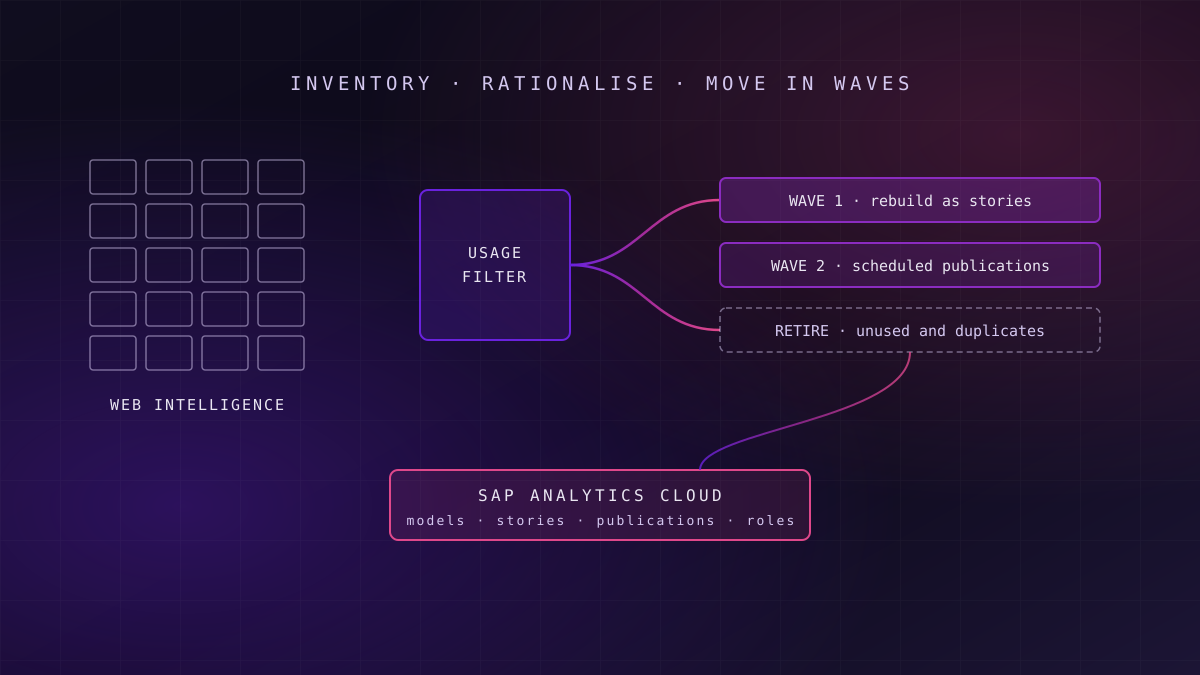
A BusinessObjects to SAP Analytics Cloud migration is a rebuild, not a conversion. Inventory the estate from audit data, retire what nobody uses, rebuild universes as governed models, re-create the surviving Web Intelligence reports as stories, then replace schedules with publications. Move in waves by business domain, and keep pixel-perfect and Excel-bound reporting on its own track.
This guide assumes the platform decision is already made. If it is not, start with our comparison of BusinessObjects cloud options and the wider Power BI, Tableau and SAP Analytics Cloud comparison. What follows is the execution: what to move, in what order, and where programmes lose months.
Why Migration Effort Is Usually Underestimated
What this means for you: the report count is the wrong unit of effort; the work sits in the semantics, the schedules and the people who depend on both.
SAP BusinessObjects BI 4.3 leaves mainstream maintenance at the end of 2026, according to SAP Knowledge Base Article 3763590, published in 2025. That date turns a deferred decision into a programme with a deadline. The first estimate is usually built on the number of Web Intelligence documents, multiplied by an average rebuild time. It is almost always wrong, and in a predictable direction.
A Web Intelligence report is the visible tip of three things a business has built up over many years: a universe that encodes joins, contexts and business definitions; a schedule that delivers files to people who never log in; and a security model that decides who sees which rows. None of those move automatically. SAP's Report Conversion Tool converts older Desktop Intelligence documents into Web Intelligence inside the BI platform; it does not convert anything into SAP Analytics Cloud.
Failure mode
There is no one-click converter
Partner tools can automate parts of rebuilding Web Intelligence reports as SAP Analytics Cloud stories, and they can save real effort on simple reports. None of them carry universe logic, schedules and security across in one step, so plan the programme as a rebuild with accelerators, not as a conversion.
The practical consequence is that the programme should be scoped on objects other than reports. Universes, schedules, user groups and the small number of complex reports that finance and operations depend on decide the timeline far more than the long tail of ad hoc documents.
Step One: Inventory and Rationalise
What this means for you: the cheapest report to migrate is the one you prove nobody needs.
The six object types to count
Before any rebuild, count six things: Web Intelligence documents, universes, schedules and their recipients, user groups and access levels, Crystal Reports, and Analysis for Office workbooks. Each has a different destination and a different effort profile, and a programme that counts only the first one will discover the other five during testing.
Use audit data, not opinion
The BusinessObjects audit database records who opened, refreshed and scheduled each document. Twelve months of that data is the most reliable evidence available. It routinely shows a long tail of documents nobody has opened in a year, duplicates that differ only in a filter, and personal copies of shared reports.
No use in twelve months
Archive the document and its output, notify the owner, and do not migrate it. Keep the archive searchable for audit purposes.
Duplicates and near-copies
Collapse variants that differ only in filters or prompts into one story with input controls or variables.
Used, owned, and still needed
Rebuild in SAP Analytics Cloud, in the wave that matches its business domain and its data source.
Give every surviving document a named business owner who signs off its replacement. Reports without an owner who will sign are candidates for retirement, not migration.
Universes, Models and Live Connections
What this means for you: decide where business definitions will live before you rebuild a single story, or you will rebuild them twice.
A universe holds business definitions: measures, dimensions, joins, contexts and row-level restrictions. SAP Analytics Cloud does not use universes as its native semantic layer. It offers two broad routes: a live connection to the source, where definitions stay in the source system, or an import model, where data and definitions are loaded into SAP Analytics Cloud.
| Source behind the universe | Typical SAP Analytics Cloud route | Watch for | Choose this when |
|---|---|---|---|
| SAP BW or BW/4HANA | Live connection to BW queries | Query design now carries the semantics the universe used to hold | BW stays in the landscape for the medium term |
| SAP Datasphere or SAP HANA | Live connection to analytic models or views | Single sign-on must be configured for scheduled publications | The data platform is SAP-centred and modern |
| Relational database or data warehouse | Import model, or a governed view layer with live access | Refresh windows and model size | Definitions can move into a governed view layer |
| Universe kept during transition | Live connection through SAP BusinessObjects Live Data Connect | A bridge that preserves the dependency on the BI platform | You need stories quickly while models are rebuilt |
The bridge row deserves caution. Connecting SAP Analytics Cloud to existing universes gets stories in front of users faster, but it keeps the BI platform alive and postpones the semantic decision rather than making it. Use it for a defined period, with an end date.
Where the estate also depends on SAP BW, the universe decision is tied to the warehouse decision, which our BW to Datasphere migration guide covers. Wherever the definitions land, treat them as a semantic layer with owners and tests, the argument made in our explainer on what a semantic layer is and when you need one.
Web Intelligence Reports Versus SAP Analytics Cloud Stories
What this means for you: stories are built for interactive analysis first; plan separately for reports that exist to be printed, exported or distributed.
Web Intelligence grew up as a reporting tool: multi-block documents, sections and breaks, many queries combined in one document, and output designed to be exported. SAP Analytics Cloud stories are built for interactive dashboards and guided analysis, with tables, charts, filters and drill paths. SAP has added report-style capabilities over successive releases, including grid-like tables and better export, but the design model is different.
Migrate the decision each report supports, not the layout it happens to have.
In practice, reports fall into three groups. Analytical reports that people explore on screen translate well and often improve. Operational lists used to drive daily work translate adequately as filtered tables. Formatted documents, such as statutory packs, invoices-style layouts and banded financial statements, translate poorly and belong on a separate track.
Rebuild patterns that save time
Build a small set of story templates per business domain, with agreed filters, layout and colour, and rebuild into them rather than designing each report afresh. Combine multi-query documents into one model where the joins are legitimate, and push complex calculations into the model rather than the story, so that the next report reuses them. The broader principles for enterprise data visualisation apply: a consistent grammar beats a faithful copy.
Schedules, Publications and Bursting
What this means for you: the people who receive scheduled files are often your largest and least visible user group, and they notice first when delivery breaks.
Schedules are where migrations quietly fail. A Web Intelligence estate can deliver thousands of files a month to recipients who never open the BI platform at all. SAP Analytics Cloud replaces this with scheduled publications that send stories as PDF or PowerPoint files by email. SAP added bursting to publications in 2021, according to an SAP blog from November that year, so each recipient can receive a copy filtered by their own data authorisation.
Readiness signal
Readiness signal: can you list every recipient?
Export every active schedule with its format, frequency, recipients and destination. If the list includes file shares, FTP targets or external recipients, confirm how each will be served before the first wave, because email publication does not cover every destination.
Native publications have limits on delivery size and formats, and stories built on some live connections need single sign-on configured before they can be scheduled. Where an estate depends on high-volume bursting or file-based delivery, third-party broadcasting tools exist for SAP Analytics Cloud; evaluate them against the schedule inventory rather than assuming the native feature will cover it.
A report nobody opens can still be a report somebody reads every morning in their inbox.
Security, Crystal Reports and Analysis for Office
What this means for you: three items sit outside the main rebuild, and each needs its own owner and date.
Security mapping
BusinessObjects security combines user groups, access levels and universe restrictions. SAP Analytics Cloud uses roles, teams and data access control on models, with live connections inheriting authorisation from the source. Map groups to roles explicitly, and test row-level restrictions with real user accounts. A report that shows the right layout to the wrong people is the most damaging defect a migration can produce.
Crystal Reports
Crystal Reports exist for pixel-perfect output: forms, statements and regulated documents. They are not a natural fit for stories. Options are to keep them on BI 2025, move them to a dedicated document-generation tool, or redesign them where the format is no longer mandated. Decide per report family, not per report.
Analysis for Office
Analysis for Office is an Excel add-in that users depend on for planning and reconciliation. SAP offers an add-in for Microsoft Office that connects to SAP Analytics Cloud, but the workflow differs. Interview the heaviest users early, because Excel-bound processes are where adoption resistance concentrates.
A Four-Wave Migration Plan
What this means for you: waves organised by business domain and data source keep each cut-over small enough to test properly.
Foundations
Inventory, rationalisation, target models, story templates, role design and the publication approach. Nothing moves to users yet.
One domain, analytical reports
Pick a domain with clean data and engaged owners. Rebuild its analytical reports as stories and run both platforms in parallel.
Scheduled and operational reporting
Move schedules to publications, with recipient-by-recipient sign-off and a reconciliation of output against the old files.
Remaining domains and decommission
Repeat by domain, then retire universes, schedules and finally the BI platform, keeping the archive.
Each wave needs reconciliation: the same figures, for the same period and filters, in the old report and the new story, signed off by the owner. That discipline is what a migration factory brings, and it is the same reconciliation-first approach our guide to protecting analytics through an S/4HANA conversion applies to the warehouse layer.
Timing should carry scope. A first domain wave, with a clean source and a handful of report families, typically moves in weeks once Wave 0 is done; a large estate with many universes and heavy scheduling is a multi-quarter programme. Running both platforms in parallel costs licences and support, so set a decommission date per wave and hold it.
When to Keep BusinessObjects, or Choose Another Tool
What this means for you: moving everything to SAP Analytics Cloud is not automatically the right outcome.
Keep part or all of the estate on BusinessObjects BI 2025, on-premise or in SAP's Private Cloud Edition, when formatted reporting dominates, when Crystal Reports carry regulated documents, or when the schedule estate is large and stable and works. Upgrading buys time and keeps proven output running, at the cost of staying on an older reporting model.
Choose a non-SAP tool when most of the data no longer sits in SAP systems and the organisation has already standardised elsewhere; the trade-offs between the three main platforms are set out in the comparison linked at the top of this guide. A hybrid end state, with analytical reporting on SAP Analytics Cloud and formatted output elsewhere, is often the honest answer rather than a compromise.
Key idea
The goal is the reporting the business needs, not a platform count
A smaller, owned, reconciled set of reports on the right tools is a better outcome than every legacy document faithfully reproduced on one platform.
Whatever the mix, the SAP BusinessObjects modernisation work starts the same way: with evidence of what is used.
Where to Start This Quarter
What this means for you: four pieces of evidence turn a migration debate into a plan you can cost.
First, extract twelve months of audit data and produce the usage view: documents, opens, refreshes, schedules and recipients. Second, list universes with their sources, and decide the target for each definition: BW query, Datasphere model, governed view or import model. Third, export the schedule inventory, because it defines Wave 2. Fourth, pick the first domain, ideally one with clean data, an engaged owner and a manageable report count.
With those four in hand, Wave 0 can be scoped properly and the end-2026 maintenance date becomes a plan rather than a threat. For estates that also need modernised data analytics underneath the reports, sequence the model work first, so the stories are built once.
Frequently Asked Questions
Can Web Intelligence reports be converted to SAP Analytics Cloud automatically?
Not fully. SAP's Report Conversion Tool converts Desktop Intelligence documents into Web Intelligence, not into SAP Analytics Cloud. Partner tools can automate parts of rebuilding Web Intelligence reports as stories, which helps with simple reports, but universe logic, schedules and security still need to be redesigned. Plan the migration as a rebuild with accelerators rather than a one-step conversion.
Can SAP Analytics Cloud use existing BusinessObjects universes?
Yes, during a transition. SAP BusinessObjects Live Data Connect lets SAP Analytics Cloud connect live to existing universes, so stories can be built before models are redesigned. It keeps the BI platform running and postpones the semantic decision, so treat it as a bridge with an end date rather than the target architecture for the migrated estate.
How do scheduled Web Intelligence reports move to SAP Analytics Cloud?
They become scheduled publications, which send stories as PDF or PowerPoint files by email on a recurrence. Bursting, added in 2021, sends each recipient a copy filtered by their own data authorisation. Check delivery limits, file destinations and single sign-on requirements against your schedule inventory, and consider third-party broadcasting tools where volumes are high.
What happens to Crystal Reports in a move to SAP Analytics Cloud?
Crystal Reports are built for pixel-perfect documents such as statements and forms, which SAP Analytics Cloud stories are not designed to reproduce. The usual options are to keep them on BusinessObjects BI 2025, move them to a document-generation tool, or redesign them where the fixed format is no longer required. Decide per report family rather than per report.
How long does a BusinessObjects to SAP Analytics Cloud migration take?
It depends on universes, schedules and formatted reporting more than on the report count. After a foundations wave covering inventory, models, templates and roles, a first domain with a clean source typically moves in weeks. A large estate with many universes and heavy scheduling is a multi-quarter programme, delivered in waves with reconciliation and a decommission date for each.
Unolabs is a Data and AI first engineering consultancy, headquartered in the United Kingdom with engineering operations in Pune and active engagements across the UK, Australia, and Hong Kong. We help enterprises build the architectural foundation for autonomous AI execution — governed data platforms, semantic intelligence, and agentic systems that enterprises can stand behind.
If you are planning a BusinessObjects to SAP Analytics Cloud migration, book a discovery call and we will work through it with you.
More Where
This Came From.
New architectural deep-dives land every two weeks. Pick your channels and we will send them as they publish.
Continue reading
- SAP ModernisationS/4HANA by 2027: Protecting the Analytics Estate During ConversionAn ECC to S/4HANA conversion changes the tables, extractors, and embedded analytics your reporting depends on. Here is the continuity playbook.14 min read
- SAP ModernisationSAP S/4HANA Is Not a Migration Project. It's a Data Architecture Decision.S/4HANA overruns when treated as a move. Why consolidation, the BW estate and the semantic layer decide the outcome, plus three questions to ask first.14 min read
- SAP ModernisationS/4HANA Data Migration: What the Migration Cockpit Does and Where It Runs OutWhat the SAP S/4HANA Migration Cockpit handles, the five gaps it leaves to your programme, and when a migration factory or extra tooling is needed.13 min read
Turn your Web Intelligence estate into a wave plan
We will read your BusinessObjects audit, universe and schedule data and return a costed SAP Analytics Cloud wave plan, including what to retire and what to keep on BI 2025.
Book a BO to SAC Wave Plan