Data Platform Strategy
Executive Dashboard Design: Standards Senior Leaders Actually Use
Executive dashboard design standards: start from decisions, govern a few KPIs, show variance, label freshness, design for access, and know when to write.
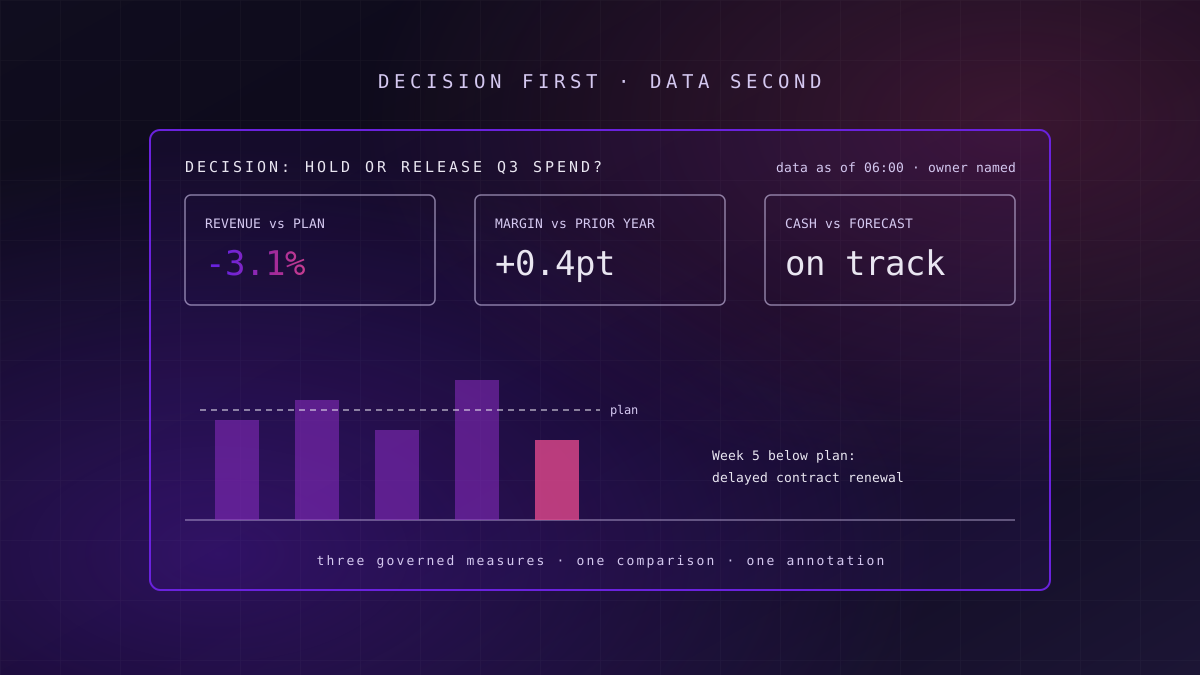
An executive dashboard gets used when it answers a named decision with a handful of governed measures, each shown against a target or prior period, with a clear owner and a visible data-as-of time. Most fail because they are built from available data rather than from decisions, and a short written briefing would often serve better.
Most organisations have more dashboards than anyone can name, and fewer than they think are opened by the people they were built for. The problem is rarely the tool. It is that the dashboard was designed around the data that was easy to reach, not around the decision a senior leader has to make on Monday morning.
Why Most Executive Dashboards Go Unused
What this means for you: if your leadership team still asks for numbers by email after a dashboard launches, the dashboard is answering a question nobody asked.
Executive dashboards tend to fail in three predictable ways. They show too much, because every stakeholder in the build added a measure and nobody removed one. They show numbers without context, so a leader sees revenue of a given value but not whether that is good, bad or expected. And they disagree with the numbers in the board pack, which destroys trust faster than any design flaw.
Senior leaders are time-poor and sceptical, and they make a judgement about a dashboard in the first few seconds. If those seconds produce a question rather than an answer, they go back to asking a person. The dashboard then becomes an expensive artefact that the analytics team maintains and nobody reads.
Failure mode
Failure mode: the dashboard nobody trusts
When the revenue figure on the dashboard differs from the board pack by a small, unexplained amount, leaders stop using the dashboard entirely. One contested number is enough. Agreement with the official figures matters more than any visual choice.
The fix is not better charts. It is a different starting point, and a short set of standards applied to every executive view.
Start From the Decision, Not the Data
What this means for you: write down the decision first; any measure that does not inform it does not belong on the page.
Before anyone opens a design tool, name the decision the dashboard supports and who makes it. "Should we release or hold the next quarter's discretionary spend?" is a decision. "Sales performance" is a topic. A decision tells you which measures matter, which comparisons are needed, how often the view must refresh and who must trust it.
A useful test is to ask the leader what they would do differently if a number moved. If the honest answer is "nothing", the number is interesting but not decision-relevant, and it belongs in an analyst's exploration view rather than on the executive page.
A dashboard built from available data answers the questions the data team could reach, not the questions the leadership team has.
This is the same discipline that sits behind a sound data and AI roadmap: decisions first, then the data that serves them. It also keeps the scope honest when stakeholders ask for "just one more chart".
Govern a Small Set of KPIs
What this means for you: every number on an executive dashboard needs one definition, one owner and one target, or it will eventually be argued about in a meeting.
An executive view rarely needs more than five to seven headline measures. Each should be governed: a written definition, a named business owner who answers for it, a target or threshold, and a documented source. Without this, two dashboards will show two different figures for the same measure, and the conversation turns from the business to the arithmetic.
The definitions should not live inside the dashboard. When measures are defined in a semantic layer, every report, dashboard and AI assistant reads the same calculation, and a change is made once. Our guide to what a semantic layer is and when you need one covers where those definitions can live and the trade-offs of each option.
| Standard | What it requires | Signal it is missing |
|---|---|---|
| Decision named | The page states the decision it supports and who makes it | Nobody can say what action the page is for |
| Governed measures | Five to seven KPIs, each with a definition, owner and target | Two reports show different values for one measure |
| Comparison by default | Every number shown against plan, prior period or forecast | Leaders ask "is that good?" |
| Annotation | Material variances carry a one-line explanation | Leaders email the analyst to ask why |
| Freshness label | A visible data-as-of time and refresh cadence | Decisions made on yesterday's data without anyone knowing |
| Accessible design | WCAG 2.2 contrast, colour-blind-safe palette, no meaning in colour alone | Some leaders cannot read the red and green |
| Measured adoption | Usage tracked per view and reviewed quarterly | Dashboards nobody opens stay in production |
Layout, Hierarchy and Chart Choice
What this means for you: the most important number should be the first thing the eye lands on, and every chart should be the simplest one that answers the question.
Readers in left-to-right languages scan from the top left. Put the headline measures there, in a single row, with the most important first. Supporting detail belongs below or behind a drill-through, not competing for attention on the first screen. White space is not wasted space; it separates ideas so the eye does not have to.
Chart choice should follow the question. Bars compare categories. Lines show change over time. A single number with its comparison answers "where are we?" faster than any chart. Pie charts with more than two or three slices, 3D effects, gauges and dual axes tend to obscure more than they reveal, and most executive questions do not need them.
One message per view
Each chart should answer one question that can be written as a sentence. If it needs two sentences, it needs two charts.
Consistent notation
Actuals, plan, forecast and prior year should look the same on every page, so leaders learn the visual language once.
Integrity over impact
Axes start at zero for bars, scales are not truncated to exaggerate change, and like is compared with like.
These principles echo the International Business Communication Standards (IBCS), which set out rules for conveying a message, consistent semantic notation, visual integrity and avoiding clutter in reports and dashboards. A shared notation is what lets a leader move between finance, sales and operations views without relearning how to read them.
Comparison, Variance and Annotation
What this means for you: a number on its own invites a question; a number with its comparison and a short explanation answers it.
Every headline measure should appear with at least one comparison: against plan, against the same period last year, or against forecast. Show the variance explicitly, as a value or percentage, rather than leaving the reader to subtract in their head. Use consistent conventions for favourable and unfavourable variance across every page.
Annotation is the most neglected standard and often the most valuable. When a measure moves materially, a one-line note from the owner, such as a delayed contract or a pricing change, turns a chart into an explanation. It also stops the cycle of leaders emailing analysts to ask what happened, which is where much of an analytics team's week goes.
Key idea
The variance is the message
Leaders rarely act on a level; they act on a gap between where they are and where they expected to be. Design every headline measure around that gap, and explain the material ones in plain words.
Annotations need an owner and a process, or they go stale. A practical pattern is for the measure owner to add or confirm a note as part of the regular reporting cycle, with notes older than the current period hidden automatically.
Accessibility, Mobile and Data Freshness
What this means for you: a dashboard that some of your leaders cannot read, or that hides how old its data is, will be used to make the wrong decisions.
The Web Content Accessibility Guidelines, WCAG 2.2, published by the W3C in October 2023, set the practical baseline: text contrast of at least 4.5:1 at level AA, and at least 3:1 for meaningful graphics such as chart marks against their background. The NHS estimates that around one in twelve men has some form of colour vision deficiency, so red against green as the only signal will fail some of your board.
Use a colour-blind-safe palette, and never carry meaning in colour alone: pair colour with a symbol, label or position. Make text large enough to read on a laptop in a meeting room, and test the executive view on a phone, because that is where many leaders will first open it. A mobile layout is usually a reordering of the same headline measures, not a separate product.
Every executive page should show a visible data-as-of time and the refresh cadence, for example "data as of 06:00, refreshed daily". When a pipeline fails, the label should change to say so, rather than quietly showing yesterday's numbers. Freshness is a data quality service level in its own right, and the monitoring behind it is covered in our guide to data observability and quality management.
Readiness signal
Readiness signal: can a leader tell how old the numbers are?
Open your main executive dashboard and find the data-as-of time without hovering, clicking or asking. If you cannot do it in five seconds, neither can your leadership team.
Turn the Standards Into a Reusable Kit
What this means for you: standards written in a document are ignored; standards built into a template are followed by default.
Once the standards are agreed, encode them as a kit: a page template with the headline row, comparison and annotation slots, and freshness label already in place; a colour palette that passes contrast checks; chart defaults with consistent notation; and a short checklist that every executive view passes before release. Analysts then start from a page that is already right, instead of reinventing layout each time.
The kit should be tool-agnostic in principle and implemented in whichever platform you use. If you are still choosing that platform, our comparison of Power BI, Tableau and SAP Analytics Cloud sets out where governance and semantic models live in each. For estates moving off SAP BusinessObjects, the same kit is a sensible moment to retire old report designs; the options are covered in our guide to BusinessObjects cloud options.
A design standard that lives in a slide deck is a suggestion; one built into the template is a habit.
Lineage matters here too. A leader who questions a number should be able to see, in one click, where it came from. Visible data lineage from the headline measure to its source turns a challenge in the boardroom into a short answer rather than an action point.
Measure Adoption, and Retire What Is Not Used
What this means for you: if you do not measure who opens each dashboard, you cannot tell a useful view from an expensive ornament.
Most BI platforms record views per report and per user. Review this quarterly for every executive view: who opened it, how often, and whether usage is rising or falling. A dashboard with no executive views in a quarter should be retired or rebuilt, and the decision recorded, so the estate shrinks rather than growing without limit.
Adoption is also a design signal. If leaders open a dashboard but still email for numbers, the view is not answering their question. A short conversation with two or three users usually finds the gap faster than any analytics on usage.
When a Written Briefing Beats a Dashboard
What this means for you: some decisions are better served by three paragraphs than by any dashboard, and recognising them saves months of build.
Dashboards are good at monitoring: a stable set of measures, refreshed on a schedule, scanned for exceptions. They are poor at explaining why something happened, weighing options or making a recommendation. For a quarterly strategy review, a pricing decision or an investment case, a short written briefing with two or three charts embedded in the argument will usually serve leaders better.
A dashboard is also the wrong investment when the decision is made rarely, when the underlying data is not yet governed, or when the audience is a handful of people who would read a one-page note. In those cases, building and maintaining a dashboard adds cost without adding clarity. The honest answer is sometimes to stop building and start writing.
Where to Start
What this means for you: a focused review of your existing executive views will deliver more than a new dashboard programme.
Start with an inventory of the executive dashboards you have, the usage data for each, and the decisions they claim to support. Retire the ones nobody opens. For the three or four that matter most, apply the standards in the table above: name the decision, cut to governed measures, add comparisons and annotations, fix contrast and colour, and add a freshness label.
Then build the reusable kit from what you learned, so every new executive view starts from the standard. A focused first wave, three or four views for one leadership team, typically moves in weeks rather than quarters; extending the kit across the organisation is the longer work. Our data visualisation and data analytics services cover both, and the governed definitions underneath sit with our semantic AI practice.
Frequently Asked Questions
How many KPIs should an executive dashboard show?
Five to seven headline measures is a practical ceiling for an executive view. Each should support a named decision and carry a definition, an owner and a target. More detail can sit behind a drill-through, but the first screen should be readable in seconds. If stakeholders cannot agree which measures to cut, that disagreement is the real problem to solve before any design work starts.
What colours should an accessible dashboard use?
Use a colour-blind-safe palette and never carry meaning in colour alone; pair colour with a label, symbol or position. WCAG 2.2 sets a minimum contrast of 4.5:1 for normal text and 3:1 for meaningful graphics such as chart marks. The NHS estimates that around one in twelve men has some colour vision deficiency, so red against green alone will fail some readers.
How often should an executive dashboard refresh?
As often as the decision it supports needs, and no more. Daily is common for operational measures, weekly or monthly for financial ones. Whatever the cadence, show a visible data-as-of time and the refresh schedule on the page, and make the label change when a load fails, so leaders never act on stale numbers without knowing it.
What are the IBCS standards?
The International Business Communication Standards are a set of rules for designing reports, presentations and dashboards. They cover conveying a clear message, using consistent semantic notation for actuals, plans and forecasts, ensuring visual integrity, choosing proper visualisations and avoiding clutter. Many finance teams use them so leaders can read any report in the organisation the same way.
When is a dashboard the wrong answer?
When the decision is made rarely, when it needs explanation and judgement rather than monitoring, or when the underlying data is not yet governed. In those cases a short written briefing with two or three supporting charts usually serves leaders better and costs far less to produce and maintain than a dashboard that nobody opens.
Unolabs is a Data and AI first engineering consultancy, headquartered in the United Kingdom with engineering operations in Pune and active engagements across the UK, Australia, and Hong Kong. We help enterprises build the architectural foundation for autonomous AI execution — governed data platforms, semantic intelligence, and agentic systems that enterprises can stand behind.
If you are weighing how to make your executive dashboards earn their place, book a discovery call and we will work through it with you.
More Where
This Came From.
New architectural deep-dives land every two weeks. Pick your channels and we will send them as they publish.
Continue reading
- Data Platform StrategyBig Data Analytics in Retail: The Five Use Cases That Pay Back, and What Each One Needs FirstBig data analytics in retail pays back in five places. What each use case needs, where it stops paying off, and the platform UK retailers build first.14 min read
- Data Platform StrategyHow to Choose a Data and AI Consultancy: A Buyer's ChecklistA vendor-neutral checklist for choosing a data and AI consultancy: the questions to ask, the evidence to demand, the red flags, and how to test the exit.13 min read
- Data Platform StrategyHow to Sequence a Data and AI Roadmap: What Goes First, and What WaitsHow to sequence a data and AI roadmap: decisions first, then foundations, platform and AI, funded in waves over 90 days, 12 months and 24 months.14 min read
Find out which of your dashboards leaders actually use
We will review your executive dashboards against the seven standards above, check usage data, and tell you which to rebuild, which to retire and which to replace with a written briefing.
Book a Dashboard Review